In this article:
Sometimes website or application web data can get stuck. The way to resolve this is to clear the cache.
Polleverywhere.com, Pollev.com, or Google Slides
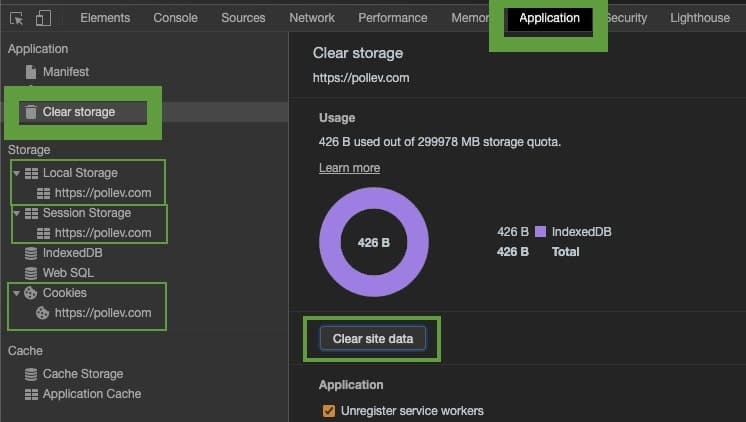
Step 1: With the website in focus, hit the F12 key on your keyboard. Alternatively, right click on the page, select Inspect menu item, and click the Console tab.
Step 2: Click the Application tab.
Step 3: Click Clear storage.
Step 4: Click Clear site data.
Step 5: Expand the Local storage, Session storage, and Cookies menu. Right click on each item in their list and click Clear.
Windows
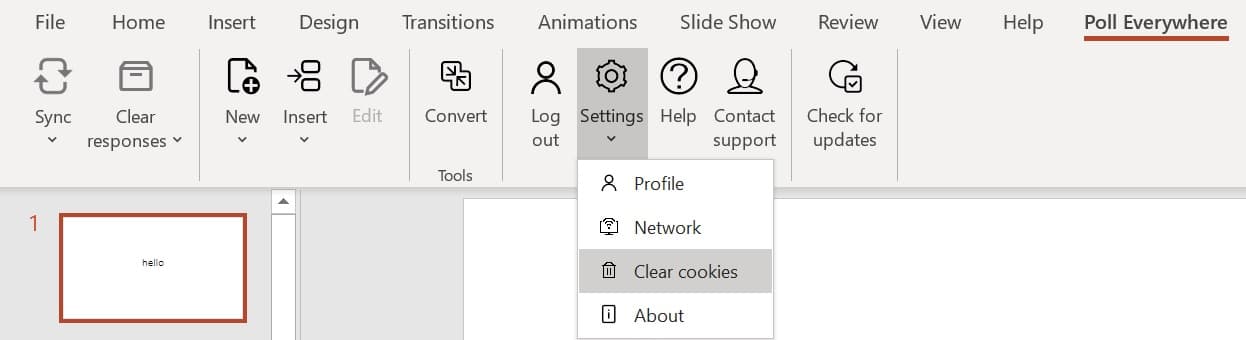
Step 1: Go to the Poll Everywhere tab within the PowerPoint ribbon.
Step 2: Click Settings.
Step 3: Click Clear cookies and cache.
Note: This will log you out. Log back in by clicking the Login button.
Mac
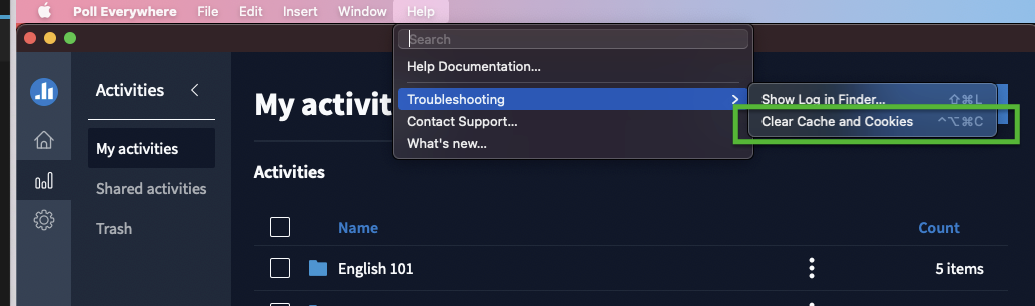
Step 1: Click on the Poll Everywhere dock icon.
Step 2: In the system menu, click Help.
Step 3: post 2.50.0: click Troubleshooting
Step 4: Click Clear Cache and Cookies.
Note: This will log you out. Log back in by click Poll Everywhere menu, and clicking Login option.