
In this article:
There are several ways that Windows and Office interfere with Poll Everywhere communicating with PowerPoint. Having the Preview Pane enabled is one of those ways.
Turn off Preview Pane
When the Preview Pane feature is enabled, PowerPoint files will be in a hidden presentation mode that disallow other tools to access it.
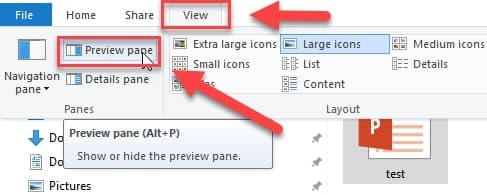
To fix this, you will need to turn off the Preview Pane feature off in Windows Explorer.
Step 1: From the start menu, type File Explorer.
Step 2: Click the View tab
Step 3: Click on Preview pane button to toggle off this functionality.
Step 4: Restart PowerPoint.
Repair Office
If that does not work, please try repairing Office.
If you continue to have trouble please gather your logs and contact support.